S3 and GCS as destinations are deprecated and no longer actively maintained. They remain fully functional and no code is currently being removed. For new mirrors, we recommend ClickHouse, ClickHouse Cloud, or Postgres as the destination.
PeerDB support Change-Data-Capture (CDC) from PostgreSQL to S3 and GCS buckets in the form of AVRO files in the destination.
We utilise the interoperability between GCS and S3 here.
Suppose you have a banking application running on PostgreSQL. There are two tables: “users” and “transactions.” You want to sync these tables in real-time to AVRO files in your S3 or GCS buckets which other services or clients can pick up.
For the same user, create and attach a policy as below using JSON editor. Sharing AWS docs for reference. PeerDB requires s3:ListAllMyBuckets, s3:GetObject, s3:PutObject, s3:ListBucket and s3:DeleteObject on that bucket.
To facilitate real-time Change Data Capture (CDC) from PostgreSQL to S3 or GCS, set up your peers and then create a mirror using the following SQL syntax:
CREATE MIRROR IF NOT EXISTS <mirror-name>FROM <postgres-peer-name> TO <storage-peer-name>WITH TABLE MAPPING( <source-schema>.<table>:<destination_name>, ... -- Repeat as required for multiple tables)WITH( max_batch_size = <number>, publication_name = '<publication-name>');
Example:
CREATE MIRROR IF NOT EXISTS test_mirror_interopFROM test_pg_peer TO test_gcs_peerWITH TABLE MAPPING( schema1.table1:dest_table1, schema1.table2:dest_table2 -- Add more tables as required)WITH( max_batch_size = 300000, publication_name = 'test_publication');
Parameters:
mirror-name: Desired name for the mirror.
postgres-peer-name: Name of the PostgreSQL peer.
storage-peer-name: Name of the S3/GCS peer.
max_batch_size: Maximum number of records in a batch.
publication_name: Name of the publication.
Remember to adjust placeholder values (<…>) with your specific details and preferences.
The example above has been abbreviated for clarity; ensure you provide all the necessary mappings and configurations in practice.
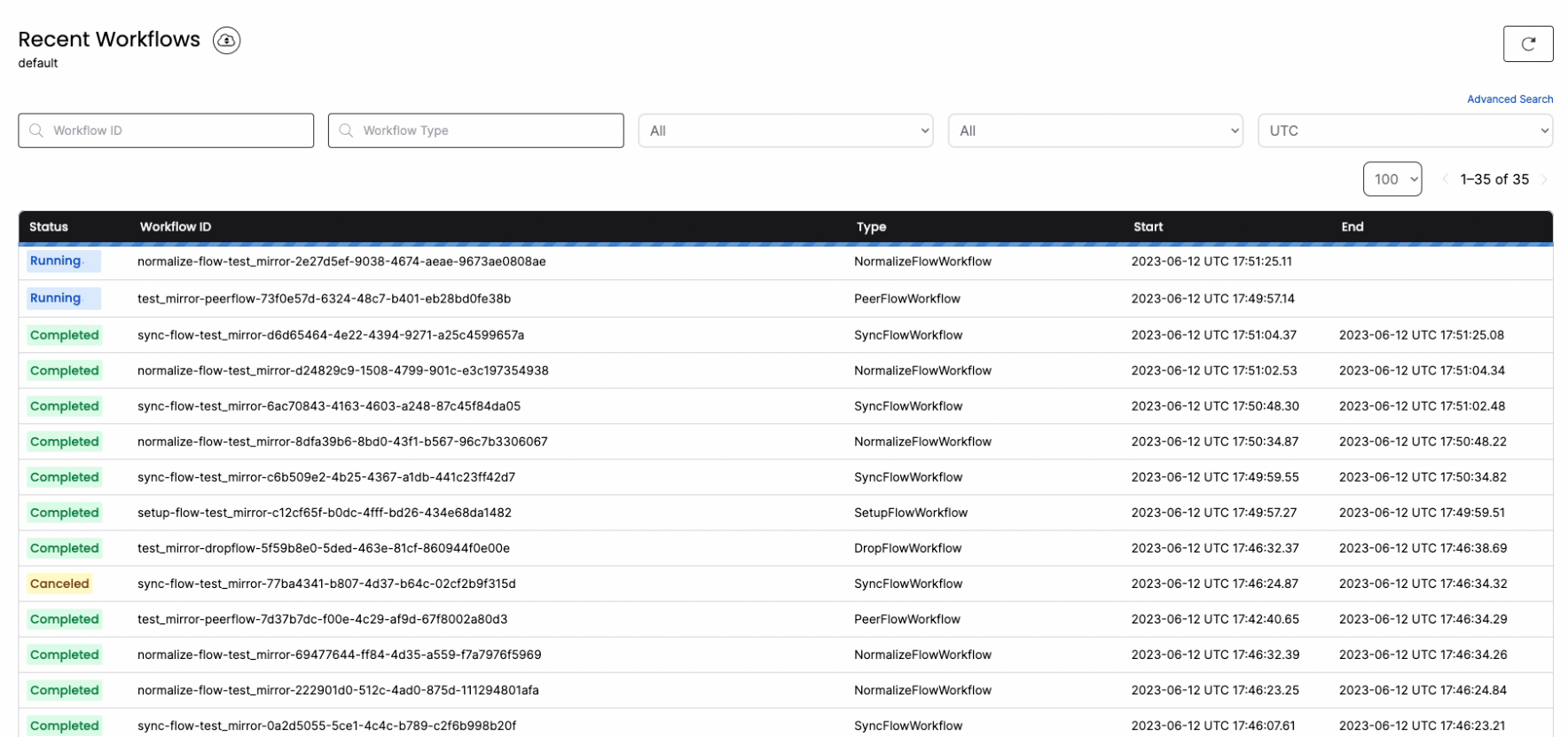
You can connect to localhost:8085 to get full visibility into the different jobs and steps that PeerDB is taking under the covers to manage the MIRROR.
To make it easy in your development and test environments, PeerDB also introduces the DROP MIRROR command. DROP MIRROR drops all the underlying objects that CREATE MIRROR generates. More details are available in this PR.
-- drop the mirrorDROP MIRROR test_mirror_interop;
{"docsConfig":{"$schema":"https://mintlify.com/docs.json","theme":"mint","name":"PeerDB Docs: Setup your ETL in minutes with SQL.","colors":{"primary":"#248736","light":"#248736","dark":"#248736"},"favicon":"https://mintcdn.com/peerdb/MRN5BST_xrBv7brJ/favicon.png?fit=max\u0026auto=format\u0026n=MRN5BST_xrBv7brJ\u0026q=85\u0026s=bcb6625d7fc622364e8380f49bc07790","logo":{"light":"https://mintcdn.com/peerdb/wtgPI5cQwjI2FO0m/logo/docs-logo-light.png?fit=max\u0026auto=format\u0026n=wtgPI5cQwjI2FO0m\u0026q=85\u0026s=90ac5de385106617a465b7ba4d33a28e","dark":"https://mintcdn.com/peerdb/wtgPI5cQwjI2FO0m/logo/docs-logo-dark.png?fit=max\u0026auto=format\u0026n=wtgPI5cQwjI2FO0m\u0026q=85\u0026s=feffd926023e0bcf9c5d4282d426fe12"},"navbar":{"primary":{"type":"button","label":"Get Started","href":"https://app.peerdb.cloud"}},"footer":{"socials":{"github":"https://github.com/PeerDB-io"}},"integrations":{"ga4":{"measurementId":"G-1V9ZZCZMB7"}},"styling":{"latex":false},"navigation":{"pages":[]}},"deployment":{"deploymentMetadataValue":{"subdomain":"peerdb","hasAudioNarration":false,"actualSubdomain":"peerdb","customDomains":["docs.peerdb.io"],"gitSource":{"type":"github","owner":"peerdb-io","repo":"docs","deployBranch":"main","contentDirectory":"","isPrivate":false,"mountPath":"","label":""},"chroma":{"liveDeploymentHistoryId":"6a8893018e352becf1ac8d39","collectionId":"dc037637-3209-4796-8664-2e77fd9c1f6c","schemaVersion":"v3","latestBuiltDeploymentHistoryId":"6a8893018e352becf1ac8d39"},"entitlements":{"AI_CHAT":{"status":"ENABLED"},"WEB_MCP":{"status":"ENABLED"},"NARRATION":{"status":"ENABLED"}},"buildId":"6a8893018e352becf1ac8d39:success","clientVersion":"0.0.4021","searchFilterCounts":[{"language":"default","tag":"Documentation","count":75},{"language":"default","tag":"Setup","count":17},{"language":"default","tag":"API Reference","count":14},{"language":"default","tag":"API Endpoints","count":14},{"language":"default","tag":"Use-cases","count":12},{"language":"default","tag":"SQL Reference","count":10},{"language":"default","tag":"SQL Commands","count":10},{"language":"default","tag":"PostgreSQL Setup Guide","count":9},{"language":"default","tag":"Features","count":9},{"language":"default","tag":"Mirror","count":9}]},"assistantConfig":{},"basePath":"","hasChatPermissions":true,"hasWebMcpPermissions":true,"toggles":[{"name":"kill-isr","enabled":true,"variant":{"name":"disabled","enabled":false,"feature_enabled":true},"impressionData":false},{"name":"agent-mintlify-slack","enabled":true,"variant":{"name":"disabled","enabled":false,"feature_enabled":true},"impressionData":false},{"name":"agent-integrations-settings","enabled":true,"variant":{"name":"disabled","enabled":false,"feature_enabled":true},"impressionData":false},{"name":"automations-pr-grouping","enabled":true,"variant":{"name":"disabled","enabled":false,"feature_enabled":true},"impressionData":false},{"name":"custom-prefix","enabled":true,"variant":{"name":"disabled","enabled":false,"feature_enabled":true},"impressionData":false},{"name":"analytics-v7","enabled":true,"variant":{"name":"disabled","enabled":false,"feature_enabled":true},"impressionData":false},{"name":"user-flows-analytics","enabled":true,"variant":{"name":"disabled","enabled":false,"feature_enabled":true},"impressionData":false},{"name":"no-publish-flow","enabled":true,"variant":{"name":"disabled","enabled":false,"feature_enabled":true},"impressionData":false},{"name":"workos-onboarding","enabled":true,"variant":{"name":"disabled","enabled":false,"feature_enabled":true},"impressionData":false},{"name":"llms-txt-v2","enabled":true,"variant":{"name":"disabled","enabled":false,"feature_enabled":true},"impressionData":false},{"name":"pause-universal-search-reconcile","enabled":true,"variant":{"name":"disabled","enabled":false,"feature_enabled":true},"impressionData":false},{"name":"snapshot-serving-live","enabled":true,"variant":{"name":"disabled","enabled":false,"feature_enabled":true},"impressionData":false},{"name":"stripTemperatureMiddleware","enabled":true,"variant":{"name":"disabled","enabled":false,"feature_enabled":true},"impressionData":false},{"name":"per-site-search-delta","enabled":true,"variant":{"name":"disabled","enabled":false,"feature_enabled":true},"impressionData":false},{"name":"support-platform-pylon-zendesk","enabled":true,"variant":{"name":"disabled","enabled":false,"feature_enabled":true},"impressionData":false},{"name":"snapshot-serving","enabled":true,"variant":{"name":"disabled","enabled":false,"feature_enabled":true},"impressionData":false},{"name":"instant-rollback","enabled":true,"variant":{"name":"disabled","enabled":false,"feature_enabled":true},"impressionData":false},{"name":"granular-notifications-server","enabled":true,"variant":{"name":"disabled","enabled":false,"feature_enabled":true},"impressionData":false},{"name":"granular-notifications","enabled":true,"variant":{"name":"disabled","enabled":false,"feature_enabled":true},"impressionData":false},{"name":"editor-private-page-search","enabled":true,"variant":{"name":"disabled","enabled":false,"feature_enabled":true},"impressionData":false},{"name":"automations-fable","enabled":true,"variant":{"name":"disabled","enabled":false,"feature_enabled":true},"impressionData":false},{"name":"fixed-ai-action-pricing","enabled":true,"variant":{"name":"disabled","enabled":false,"feature_enabled":true},"impressionData":false},{"name":"automation-resolve-merge-conflict","enabled":true,"variant":{"name":"disabled","enabled":false,"feature_enabled":true},"impressionData":false},{"name":"scoped-publishing","enabled":true,"variant":{"name":"disabled","enabled":false,"feature_enabled":true},"impressionData":false},{"name":"mintql","enabled":true,"variant":{"name":"disabled","enabled":false,"feature_enabled":true},"impressionData":false},{"name":"page-level-analytics","enabled":true,"variant":{"name":"disabled","enabled":false,"feature_enabled":true},"impressionData":false},{"name":"editor-version-history-v2","enabled":true,"variant":{"name":"disabled","enabled":false,"feature_enabled":true},"impressionData":false},{"name":"billing-page-v2","enabled":true,"variant":{"name":"disabled","enabled":false,"feature_enabled":true},"impressionData":false},{"name":"workspace-projects","enabled":true,"variant":{"name":"disabled","enabled":false,"feature_enabled":true},"impressionData":false},{"name":"assistant-v5","enabled":true,"variant":{"name":"disabled","enabled":false,"feature_enabled":true},"impressionData":false},{"name":"byok-sep-25","enabled":true,"variant":{"name":"disabled","enabled":false,"feature_enabled":true},"impressionData":false},{"name":"fork-pr-previews","enabled":true,"variant":{"name":"disabled","enabled":false,"feature_enabled":true},"impressionData":false},{"name":"revalidation-jwt","enabled":true,"variant":{"name":"disabled","enabled":false,"feature_enabled":true},"impressionData":false},{"name":"vite-origin","enabled":true,"variant":{"name":"disabled","enabled":false,"feature_enabled":true},"impressionData":false},{"name":"billing-updated-9-15","enabled":true,"variant":{"name":"disabled","enabled":false,"feature_enabled":true},"impressionData":false},{"name":"workos-sso-scim","enabled":true,"variant":{"name":"disabled","enabled":false,"feature_enabled":true},"impressionData":false},{"name":"hobby-abuse-scan","enabled":true,"variant":{"name":"disabled","enabled":false,"feature_enabled":true},"impressionData":false},{"name":"dashboard-inbox","enabled":true,"variant":{"name":"disabled","enabled":false,"feature_enabled":true},"impressionData":false},{"name":"workos-signup","enabled":true,"variant":{"name":"disabled","enabled":false,"feature_enabled":true},"impressionData":false},{"name":"workos-enabled","enabled":true,"variant":{"name":"disabled","enabled":false,"feature_enabled":true},"impressionData":false}],"googleFontsInlined":false},"customCss":[],"page":{"pagePath":"usecases/real-time-cdc/postgres-to-cloud","slug":"/usecases/real-time-cdc/postgres-to-cloud","pageMetadata":{"title":"PostgreSQL To AWS S3 And Google Cloud Storage","description":null,"href":"/usecases/real-time-cdc/postgres-to-cloud"},"pageType":"default","mdx":{"mdxSource":{"compiledSource":"\"use strict\";const{Fragment:_Fragment,jsx:_jsx,jsxs:_jsxs}=arguments[0];const{useMDXComponents:_provideComponents}=arguments[0];function _createMdxContent(props){const _components={a:`a`,code:`code`,li:`li`,ol:`ol`,p:`p`,pre:`pre`,span:`span`,strong:`strong`,ul:`ul`,..._provideComponents(),...props.components},{CodeBlock,Heading,OptimizedFrame,OptimizedImage,Warning}=_components;if(!CodeBlock)_missingMdxReference(`CodeBlock`,true);if(!Heading)_missingMdxReference(`Heading`,true);if(!OptimizedFrame)_missingMdxReference(`OptimizedFrame`,true);if(!OptimizedImage)_missingMdxReference(`OptimizedImage`,true);if(!Warning)_missingMdxReference(`Warning`,true);return _jsxs(_Fragment,{children:[_jsx(Warning,{children:_jsx(_components.p,{children:`S3 and GCS as destinations are deprecated and no longer actively maintained. They remain fully functional and no code is currently being removed. For new mirrors, we recommend ClickHouse, ClickHouse Cloud, or Postgres as the destination.`})}),`\n`,_jsx(_components.p,{children:`PeerDB support Change-Data-Capture (CDC) from PostgreSQL to S3 and GCS buckets in the form of AVRO files in the destination.\nWe utilise the interoperability between GCS and S3 here.`}),`\n`,_jsx(Heading,{level:`3`,id:`scenario`,children:`Scenario`}),`\n`,_jsx(_components.p,{children:`Suppose you have a banking application running on PostgreSQL. There are two tables: “users” and “transactions.” You want to sync these tables in real-time to AVRO files in your S3 or GCS buckets which other services or clients can pick up.`}),`\n`,_jsx(Heading,{level:`3`,id:`demo`,children:`Demo`}),`\n`,_jsx(_components.p,{children:`Let’s look at a short video showcasing CDC from PostgreSQL to Google Cloud Storage with initial load.`}),`\n`,_jsx(`div`,{style:{position:`relative`,paddingBottom:`56.25%`,height:0},children:_jsx(OptimizedFrame,{src:`https://www.loom.com/embed/c0eedb0355ed44f6a9edd86a3defd8a0?sid=880445dd-8b45-4100-82a2-f6da65f3945a`,frameBorder:0,webkitallowfullscreen:``,mozallowfullscreen:``,allowFullScreen:``,style:{position:`absolute`,top:0,left:0,width:`100%`,height:`100%`}})}),`\n`,_jsx(Heading,{level:`3`,id:`prerequisites`,children:`Prerequisites`}),`\n`,_jsx(Heading,{level:`4`,id:`postgres-peer`,children:`Postgres Peer`}),`\n`,_jsxs(_components.ol,{children:[`\n`,_jsxs(_components.li,{children:[`Enable logical decoding in PostgreSQL. Ensure that the following settings/GUCs are properly configured:`,`\n`,_jsxs(_components.ol,{children:[`\n`,_jsx(_components.li,{children:`wal_level: logical`}),`\n`,_jsx(_components.li,{children:`max_wal_senders: >1`}),`\n`,_jsx(_components.li,{children:`max_replication_slots: 4`}),`\n`]}),`\n`]}),`\n`,_jsx(_components.li,{children:`Enable replication access for a PostgreSQL user - ALTER USER pg_user REPLICATION;`}),`\n`,_jsx(_components.li,{children:`Ensure that both tables have primary keys. Composite primaries are also fine. If not, make sure your tables have REPLICA IDENTITY FULL.`}),`\n`,_jsxs(_components.li,{children:[`If you are using PostgreSQL on the cloud, below links capture how to enable logical replication for each cloud:`,`\n`,_jsxs(_components.ol,{children:[`\n`,_jsx(_components.li,{children:_jsx(_components.a,{href:`https://docs.aws.amazon.com/AmazonRDS/latest/AuroraUserGuide/AuroraPostgreSQL.Replication.Logical.html#AuroraPostgreSQL.Replication.Logical.Configure`,children:`AWS RDS and Aurora PostgreSQL`})}),`\n`,_jsx(_components.li,{children:_jsx(_components.a,{href:`https://learn.microsoft.com/azure/postgresql/flexible-server/concepts-logical#pre-requisites-for-logical-replication-and-logical-decoding`,children:`Azure Database for PostgreSQL - Flexible Server`})}),`\n`,_jsx(_components.li,{children:_jsx(_components.a,{href:`https://cloud.google.com/sql/docs/PostgreSQL/replication/configure-logical-replication#configure-your-postgresql-instance`,children:`GCP Cloud SQL PostgreSQL`})}),`\n`]}),`\n`]}),`\n`]}),`\n`,_jsx(Heading,{level:`4`,id:`s3-peer`,children:`S3 peer`}),`\n`,_jsxs(_components.ol,{children:[`\n`,_jsxs(_components.li,{children:[`\n`,_jsx(_components.p,{children:`Ensure you have an existing bucket to use.`}),`\n`]}),`\n`,_jsxs(_components.li,{children:[`\n`,_jsx(_components.p,{children:`For PeerDB to access the S3 Peer, you can either use an existing AWS user or create a new AWS user.`}),`\n`]}),`\n`,_jsxs(_components.li,{children:[`\n`,_jsxs(_components.p,{children:[`Create access keys for that user through `,_jsx(_components.a,{href:`https://docs.aws.amazon.com/IAM/latest/UserGuide/id_credentials_access-keys.html#Using_CreateAccessKey`,children:`AWS Console`}),` or `,_jsx(_components.a,{href:`https://docs.aws.amazon.com/IAM/latest/UserGuide/id_credentials_access-keys.html#Using_CreateAccessKey_CLIAPI`,children:`AWS CLI`}),` or `,_jsx(_components.a,{href:`https://docs.aws.amazon.com/IAM/latest/UserGuide/id_credentials_access-keys.html#Using_CreateAccessKey_API`,children:`AWS API`})]}),`\n`]}),`\n`,_jsxs(_components.li,{children:[`\n`,_jsxs(_components.p,{children:[`For the same user, create and attach a policy as below using JSON editor. Sharing `,_jsx(_components.a,{href:`https://docs.aws.amazon.com/apigateway/latest/developerguide/api-gateway-create-and-attach-iam-policy.html`,children:`AWS docs`}),` for reference. PeerDB requires `,_jsx(_components.code,{children:`s3:ListAllMyBuckets`}),`, `,_jsx(_components.code,{children:`s3:GetObject`}),`, `,_jsx(_components.code,{children:`s3:PutObject`}),`, `,_jsx(_components.code,{children:`s3:ListBucket`}),` and `,_jsx(_components.code,{children:`s3:DeleteObject`}),` on that bucket.`]}),`\n`,_jsx(CodeBlock,{filename:``,numberOfLines:`23`,language:`json`,children:_jsx(_components.pre,{className:`shiki shiki-themes github-light-default dark-plus`,style:{backgroundColor:`#ffffff`,\"--shiki-dark-bg\":`#0B0C0E`,color:`#1f2328`,\"--shiki-dark\":`#D4D4D4`},language:`json`,children:_jsxs(_components.code,{language:`json`,numberOfLines:`23`,children:[_jsx(_components.span,{className:`line`,children:_jsx(_components.span,{style:{color:`#1F2328`,\"--shiki-dark\":`#D4D4D4`},children:` {`})}),`\n`,_jsxs(_components.span,{className:`line`,children:[_jsx(_components.span,{style:{color:`#116329`,\"--shiki-dark\":`#9CDCFE`},children:` \"Version\"`}),_jsx(_components.span,{style:{color:`#1F2328`,\"--shiki-dark\":`#D4D4D4`},children:`: `}),_jsx(_components.span,{style:{color:`#0A3069`,\"--shiki-dark\":`#CE9178`},children:`\"2012-10-17\"`}),_jsx(_components.span,{style:{color:`#1F2328`,\"--shiki-dark\":`#D4D4D4`},children:`,`})]}),`\n`,_jsxs(_components.span,{className:`line`,children:[_jsx(_components.span,{style:{color:`#116329`,\"--shiki-dark\":`#9CDCFE`},children:` \"Statement\"`}),_jsx(_components.span,{style:{color:`#1F2328`,\"--shiki-dark\":`#D4D4D4`},children:`: [`})]}),`\n`,_jsx(_components.span,{className:`line`,children:_jsx(_components.span,{style:{color:`#1F2328`,\"--shiki-dark\":`#D4D4D4`},children:` {`})}),`\n`,_jsxs(_components.span,{className:`line`,children:[_jsx(_components.span,{style:{color:`#116329`,\"--shiki-dark\":`#9CDCFE`},children:` \"Effect\"`}),_jsx(_components.span,{style:{color:`#1F2328`,\"--shiki-dark\":`#D4D4D4`},children:`: `}),_jsx(_components.span,{style:{color:`#0A3069`,\"--shiki-dark\":`#CE9178`},children:`\"Allow\"`}),_jsx(_components.span,{style:{color:`#1F2328`,\"--shiki-dark\":`#D4D4D4`},children:`,`})]}),`\n`,_jsxs(_components.span,{className:`line`,children:[_jsx(_components.span,{style:{color:`#116329`,\"--shiki-dark\":`#9CDCFE`},children:` \"Action\"`}),_jsx(_components.span,{style:{color:`#1F2328`,\"--shiki-dark\":`#D4D4D4`},children:`: `}),_jsx(_components.span,{style:{color:`#0A3069`,\"--shiki-dark\":`#CE9178`},children:`\"s3:ListAllMyBuckets\"`}),_jsx(_components.span,{style:{color:`#1F2328`,\"--shiki-dark\":`#D4D4D4`},children:`,`})]}),`\n`,_jsxs(_components.span,{className:`line`,children:[_jsx(_components.span,{style:{color:`#116329`,\"--shiki-dark\":`#9CDCFE`},children:` \"Resource\"`}),_jsx(_components.span,{style:{color:`#1F2328`,\"--shiki-dark\":`#D4D4D4`},children:`: `}),_jsx(_components.span,{style:{color:`#0A3069`,\"--shiki-dark\":`#CE9178`},children:`\"*\"`})]}),`\n`,_jsx(_components.span,{className:`line`,children:_jsx(_components.span,{style:{color:`#1F2328`,\"--shiki-dark\":`#D4D4D4`},children:` },`})}),`\n`,_jsx(_components.span,{className:`line`,children:_jsx(_components.span,{style:{color:`#1F2328`,\"--shiki-dark\":`#D4D4D4`},children:` {`})}),`\n`,_jsxs(_components.span,{className:`line`,children:[_jsx(_components.span,{style:{color:`#116329`,\"--shiki-dark\":`#9CDCFE`},children:` \"Effect\"`}),_jsx(_components.span,{style:{color:`#1F2328`,\"--shiki-dark\":`#D4D4D4`},children:`: `}),_jsx(_components.span,{style:{color:`#0A3069`,\"--shiki-dark\":`#CE9178`},children:`\"Allow\"`}),_jsx(_components.span,{style:{color:`#1F2328`,\"--shiki-dark\":`#D4D4D4`},children:`,`})]}),`\n`,_jsxs(_components.span,{className:`line`,children:[_jsx(_components.span,{style:{color:`#116329`,\"--shiki-dark\":`#9CDCFE`},children:` \"Action\"`}),_jsx(_components.span,{style:{color:`#1F2328`,\"--shiki-dark\":`#D4D4D4`},children:`: [`})]}),`\n`,_jsxs(_components.span,{className:`line`,children:[_jsx(_components.span,{style:{color:`#0A3069`,\"--shiki-dark\":`#CE9178`},children:` \"s3:GetObject\"`}),_jsx(_components.span,{style:{color:`#1F2328`,\"--shiki-dark\":`#D4D4D4`},children:`,`})]}),`\n`,_jsxs(_components.span,{className:`line`,children:[_jsx(_components.span,{style:{color:`#0A3069`,\"--shiki-dark\":`#CE9178`},children:` \"s3:PutObject\"`}),_jsx(_components.span,{style:{color:`#1F2328`,\"--shiki-dark\":`#D4D4D4`},children:`,`})]}),`\n`,_jsxs(_components.span,{className:`line`,children:[_jsx(_components.span,{style:{color:`#0A3069`,\"--shiki-dark\":`#CE9178`},children:` \"s3:ListBucket\"`}),_jsx(_components.span,{style:{color:`#1F2328`,\"--shiki-dark\":`#D4D4D4`},children:`,`})]}),`\n`,_jsx(_components.span,{className:`line`,children:_jsx(_components.span,{style:{color:`#0A3069`,\"--shiki-dark\":`#CE9178`},children:` \"s3:DeleteObject\"`})}),`\n`,_jsx(_components.span,{className:`line`,children:_jsx(_components.span,{style:{color:`#1F2328`,\"--shiki-dark\":`#D4D4D4`},children:` ],`})}),`\n`,_jsxs(_components.span,{className:`line`,children:[_jsx(_components.span,{style:{color:`#116329`,\"--shiki-dark\":`#9CDCFE`},children:` \"Resource\"`}),_jsx(_components.span,{style:{color:`#1F2328`,\"--shiki-dark\":`#D4D4D4`},children:`: [`})]}),`\n`,_jsxs(_components.span,{className:`line`,children:[_jsx(_components.span,{style:{color:`#0A3069`,\"--shiki-dark\":`#CE9178`},children:` \"arn:aws:s3:::\u003cyour-bucket-name>\"`}),_jsx(_components.span,{style:{color:`#1F2328`,\"--shiki-dark\":`#D4D4D4`},children:`,`})]}),`\n`,_jsx(_components.span,{className:`line`,children:_jsx(_components.span,{style:{color:`#0A3069`,\"--shiki-dark\":`#CE9178`},children:` \"arn:aws:s3:::\u003cyour-bucket-name>/*\"`})}),`\n`,_jsx(_components.span,{className:`line`,children:_jsx(_components.span,{style:{color:`#1F2328`,\"--shiki-dark\":`#D4D4D4`},children:` ]`})}),`\n`,_jsx(_components.span,{className:`line`,children:_jsx(_components.span,{style:{color:`#1F2328`,\"--shiki-dark\":`#D4D4D4`},children:` }`})}),`\n`,_jsx(_components.span,{className:`line`,children:_jsx(_components.span,{style:{color:`#1F2328`,\"--shiki-dark\":`#D4D4D4`},children:` ]`})}),`\n`,_jsx(_components.span,{className:`line`,children:_jsx(_components.span,{style:{color:`#1F2328`,\"--shiki-dark\":`#D4D4D4`},children:` }`})}),`\n`]})})}),`\n`]}),`\n`]}),`\n`,_jsx(Heading,{level:`4`,id:`gcs-peer`,children:`GCS peer`}),`\n`,_jsxs(_components.ol,{children:[`\n`,_jsx(_components.li,{children:`Ensure you have an existing bucket to use.`}),`\n`,_jsxs(_components.li,{children:[`For GCS, you must `,_jsx(_components.a,{href:`https://cloud.google.com/storage/docs/authentication/managing-hmackeys`,children:`create a HMAC key-pair`}),` and use this for `,_jsx(_components.code,{children:`ACCESS_KEY_ID`}),` and `,_jsx(_components.code,{children:`SECRET_ACCESS_KEY`}),` in the Docker compose file.`]}),`\n`]}),`\n`,_jsx(Heading,{level:`3`,id:`step-1-add-postgresql-and-s3/gcs-peers`,children:`Step 1: Add PostgreSQL and S3/GCS Peers`}),`\n`,_jsx(_components.p,{children:`Run the following commands to let PeerDB know about the existing PostgreSQL and S3.`}),`\n`,_jsx(CodeBlock,{filename:``,numberOfLines:`7`,language:`sql`,children:_jsx(_components.pre,{className:`shiki shiki-themes github-light-default dark-plus`,style:{backgroundColor:`#ffffff`,\"--shiki-dark-bg\":`#0B0C0E`,color:`#1f2328`,\"--shiki-dark\":`#D4D4D4`},language:`sql`,children:_jsxs(_components.code,{language:`sql`,numberOfLines:`7`,children:[_jsx(_components.span,{className:`line`,children:_jsx(_components.span,{style:{color:`#6E7781`,\"--shiki-dark\":`#6A9955`},children:`-- Connect to PeerDB`})}),`\n`,_jsxs(_components.span,{className:`line`,children:[_jsx(_components.span,{style:{color:`#1F2328`,\"--shiki-dark\":`#D4D4D4`},children:`psql `}),_jsx(_components.span,{style:{color:`#0A3069`,\"--shiki-dark\":`#CE9178`},children:`\"port=9900 host=localhost password=peerdb\"`})]}),`\n`,_jsx(_components.span,{className:`line`}),`\n`,_jsx(_components.span,{className:`line`,children:_jsx(_components.span,{style:{color:`#6E7781`,\"--shiki-dark\":`#6A9955`},children:`-- Add PostgreSQL and Event Hubs peers`})}),`\n`,_jsxs(_components.span,{className:`line`,children:[_jsx(_components.span,{style:{color:`#CF222E`,\"--shiki-dark\":`#569CD6`},children:`CREATE`}),_jsx(_components.span,{style:{color:`#1F2328`,\"--shiki-dark\":`#D4D4D4`},children:` PEER postgres_peer `}),_jsx(_components.span,{style:{color:`#CF222E`,\"--shiki-dark\":`#569CD6`},children:`FROM`}),_jsx(_components.span,{style:{color:`#1F2328`,\"--shiki-dark\":`#D4D4D4`},children:` PostgreSQL (...);`})]}),`\n`,_jsxs(_components.span,{className:`line`,children:[_jsx(_components.span,{style:{color:`#CF222E`,\"--shiki-dark\":`#569CD6`},children:`CREATE`}),_jsx(_components.span,{style:{color:`#1F2328`,\"--shiki-dark\":`#D4D4D4`},children:` PEER s3_peer `}),_jsx(_components.span,{style:{color:`#CF222E`,\"--shiki-dark\":`#569CD6`},children:`FROM`}),_jsx(_components.span,{style:{color:`#1F2328`,\"--shiki-dark\":`#D4D4D4`},children:` S3 (...);`})]}),`\n`,_jsx(_components.span,{className:`line`,children:_jsx(_components.span,{style:{color:`#6E7781`,\"--shiki-dark\":`#6A9955`},children:`-- Or, CREATE PEER gcs_peer FROM S3 (...);`})}),`\n`]})})}),`\n`,_jsxs(_components.p,{children:[`Please refer to our CREATE PEER documentation for `,_jsx(_components.a,{href:`/sql/commands/create-peer#storage-peers-s3-and-gcs`,children:`storage peers`}),`.`]}),`\n`,_jsx(Heading,{level:`3`,id:`step-2-real-time-cdc-from-postgresql-to-s3/gcs-by-creating-a-mirror`,children:_jsx(_components.strong,{children:`Step 2: Real-Time CDC from PostgreSQL to S3/GCS by creating a MIRROR`})}),`\n`,_jsx(Heading,{level:`4`,id:`create-mirror-using-ui`,children:`Create MIRROR using UI`}),`\n`,_jsx(_components.p,{children:`If you prefer a UI, you can easily create a mirror using the PeerDB UI. Refer to the below video:`}),`\n`,_jsx(`div`,{style:{position:`relative`,paddingBottom:`56.25%`,height:0},children:_jsx(OptimizedFrame,{src:`https://www.loom.com/embed/6c563a158f5e483b8c49e51eac1b1d7c?sid=e3622f0b-a86f-4554-9cce-c00420f6fb01`,frameBorder:0,webkitallowfullscreen:``,mozallowfullscreen:``,allowFullScreen:``,style:{position:`absolute`,top:0,left:0,width:`100%`,height:`100%`}})}),`\n`,_jsx(Heading,{level:`4`,id:`create-mirror-using-sql`,children:`Create MIRROR using SQL`}),`\n`,_jsx(_components.p,{children:`To facilitate real-time Change Data Capture (CDC) from PostgreSQL to S3 or GCS, set up your peers and then create a mirror using the following SQL syntax:`}),`\n`,_jsx(CodeBlock,{filename:``,numberOfLines:`10`,language:`sql`,children:_jsx(_components.pre,{className:`shiki shiki-themes github-light-default dark-plus`,style:{backgroundColor:`#ffffff`,\"--shiki-dark-bg\":`#0B0C0E`,color:`#1f2328`,\"--shiki-dark\":`#D4D4D4`},language:`sql`,children:_jsxs(_components.code,{language:`sql`,numberOfLines:`10`,children:[_jsxs(_components.span,{className:`line`,children:[_jsx(_components.span,{style:{color:`#CF222E`,\"--shiki-dark\":`#569CD6`},children:`CREATE`}),_jsx(_components.span,{style:{color:`#1F2328`,\"--shiki-dark\":`#D4D4D4`},children:` MIRROR `}),_jsx(_components.span,{style:{color:`#CF222E`,\"--shiki-dark\":`#569CD6`},children:`IF`}),_jsx(_components.span,{style:{color:`#CF222E`,\"--shiki-dark\":`#569CD6`},children:` NOT`}),_jsx(_components.span,{style:{color:`#CF222E`,\"--shiki-dark\":`#569CD6`},children:` EXISTS`}),_jsx(_components.span,{style:{color:`#CF222E`,\"--shiki-dark\":`#D4D4D4`},children:` \u003c`}),_jsx(_components.span,{style:{color:`#1F2328`,\"--shiki-dark\":`#D4D4D4`},children:`mirror`}),_jsx(_components.span,{style:{color:`#CF222E`,\"--shiki-dark\":`#D4D4D4`},children:`-`}),_jsx(_components.span,{style:{color:`#CF222E`,\"--shiki-dark\":`#569CD6`},children:`name`}),_jsx(_components.span,{style:{color:`#CF222E`,\"--shiki-dark\":`#D4D4D4`},children:`>`})]}),`\n`,_jsxs(_components.span,{className:`line`,children:[_jsx(_components.span,{style:{color:`#CF222E`,\"--shiki-dark\":`#569CD6`},children:`FROM`}),_jsx(_components.span,{style:{color:`#CF222E`,\"--shiki-dark\":`#D4D4D4`},children:` \u003c`}),_jsx(_components.span,{style:{color:`#1F2328`,\"--shiki-dark\":`#D4D4D4`},children:`postgres`}),_jsx(_components.span,{style:{color:`#CF222E`,\"--shiki-dark\":`#D4D4D4`},children:`-`}),_jsx(_components.span,{style:{color:`#1F2328`,\"--shiki-dark\":`#D4D4D4`},children:`peer`}),_jsx(_components.span,{style:{color:`#CF222E`,\"--shiki-dark\":`#D4D4D4`},children:`-`}),_jsx(_components.span,{style:{color:`#CF222E`,\"--shiki-dark\":`#569CD6`},children:`name`}),_jsx(_components.span,{style:{color:`#CF222E`,\"--shiki-dark\":`#D4D4D4`},children:`>`}),_jsx(_components.span,{style:{color:`#CF222E`,\"--shiki-dark\":`#569CD6`},children:` TO`}),_jsx(_components.span,{style:{color:`#CF222E`,\"--shiki-dark\":`#D4D4D4`},children:` \u003c`}),_jsx(_components.span,{style:{color:`#1F2328`,\"--shiki-dark\":`#D4D4D4`},children:`storage`}),_jsx(_components.span,{style:{color:`#CF222E`,\"--shiki-dark\":`#D4D4D4`},children:`-`}),_jsx(_components.span,{style:{color:`#1F2328`,\"--shiki-dark\":`#D4D4D4`},children:`peer`}),_jsx(_components.span,{style:{color:`#CF222E`,\"--shiki-dark\":`#D4D4D4`},children:`-`}),_jsx(_components.span,{style:{color:`#CF222E`,\"--shiki-dark\":`#569CD6`},children:`name`}),_jsx(_components.span,{style:{color:`#CF222E`,\"--shiki-dark\":`#D4D4D4`},children:`>`})]}),`\n`,_jsxs(_components.span,{className:`line`,children:[_jsx(_components.span,{style:{color:`#CF222E`,\"--shiki-dark\":`#569CD6`},children:`WITH`}),_jsx(_components.span,{style:{color:`#CF222E`,\"--shiki-dark\":`#569CD6`},children:` TABLE`}),_jsx(_components.span,{style:{color:`#1F2328`,\"--shiki-dark\":`#D4D4D4`},children:` MAPPING(`})]}),`\n`,_jsxs(_components.span,{className:`line`,children:[_jsx(_components.span,{style:{color:`#CF222E`,\"--shiki-dark\":`#D4D4D4`},children:` \u003c`}),_jsx(_components.span,{style:{color:`#1F2328`,\"--shiki-dark\":`#D4D4D4`},children:`source`}),_jsx(_components.span,{style:{color:`#CF222E`,\"--shiki-dark\":`#D4D4D4`},children:`-`}),_jsx(_components.span,{style:{color:`#CF222E`,\"--shiki-dark\":`#569CD6`},children:`schema`}),_jsx(_components.span,{style:{color:`#CF222E`,\"--shiki-dark\":`#D4D4D4`},children:`>`}),_jsx(_components.span,{style:{color:`#1F2328`,\"--shiki-dark\":`#D4D4D4`},children:`.`}),_jsx(_components.span,{style:{color:`#CF222E`,\"--shiki-dark\":`#D4D4D4`},children:`\u003c`}),_jsx(_components.span,{style:{color:`#CF222E`,\"--shiki-dark\":`#569CD6`},children:`table`}),_jsx(_components.span,{style:{color:`#CF222E`,\"--shiki-dark\":`#D4D4D4`},children:`>`}),_jsx(_components.span,{style:{color:`#1F2328`,\"--shiki-dark\":`#D4D4D4`},children:`:`}),_jsx(_components.span,{style:{color:`#CF222E`,\"--shiki-dark\":`#D4D4D4`},children:`\u003c`}),_jsx(_components.span,{style:{color:`#1F2328`,\"--shiki-dark\":`#D4D4D4`},children:`destination_name`}),_jsx(_components.span,{style:{color:`#CF222E`,\"--shiki-dark\":`#D4D4D4`},children:`>`}),_jsx(_components.span,{style:{color:`#1F2328`,\"--shiki-dark\":`#D4D4D4`},children:`,`})]}),`\n`,_jsxs(_components.span,{className:`line`,children:[_jsx(_components.span,{style:{color:`#1F2328`,\"--shiki-dark\":`#D4D4D4`},children:` ... `}),_jsx(_components.span,{style:{color:`#6E7781`,\"--shiki-dark\":`#6A9955`},children:`-- Repeat as required for multiple tables`})]}),`\n`,_jsx(_components.span,{className:`line`,children:_jsx(_components.span,{style:{color:`#1F2328`,\"--shiki-dark\":`#D4D4D4`},children:`)`})}),`\n`,_jsxs(_components.span,{className:`line`,children:[_jsx(_components.span,{style:{color:`#CF222E`,\"--shiki-dark\":`#569CD6`},children:`WITH`}),_jsx(_components.span,{style:{color:`#1F2328`,\"--shiki-dark\":`#D4D4D4`},children:`(`})]}),`\n`,_jsxs(_components.span,{className:`line`,children:[_jsx(_components.span,{style:{color:`#1F2328`,\"--shiki-dark\":`#D4D4D4`},children:` max_batch_size `}),_jsx(_components.span,{style:{color:`#CF222E`,\"--shiki-dark\":`#D4D4D4`},children:`=`}),_jsx(_components.span,{style:{color:`#CF222E`,\"--shiki-dark\":`#D4D4D4`},children:` \u003c`}),_jsx(_components.span,{style:{color:`#CF222E`,\"--shiki-dark\":`#569CD6`},children:`number`}),_jsx(_components.span,{style:{color:`#CF222E`,\"--shiki-dark\":`#D4D4D4`},children:`>`}),_jsx(_components.span,{style:{color:`#1F2328`,\"--shiki-dark\":`#D4D4D4`},children:`,`})]}),`\n`,_jsxs(_components.span,{className:`line`,children:[_jsx(_components.span,{style:{color:`#1F2328`,\"--shiki-dark\":`#D4D4D4`},children:` publication_name `}),_jsx(_components.span,{style:{color:`#CF222E`,\"--shiki-dark\":`#D4D4D4`},children:`=`}),_jsx(_components.span,{style:{color:`#0A3069`,\"--shiki-dark\":`#CE9178`},children:` '\u003cpublication-name>'`})]}),`\n`,_jsx(_components.span,{className:`line`,children:_jsx(_components.span,{style:{color:`#1F2328`,\"--shiki-dark\":`#D4D4D4`},children:`);`})}),`\n`]})})}),`\n`,_jsx(_components.p,{children:`Example:`}),`\n`,_jsx(CodeBlock,{filename:``,numberOfLines:`11`,language:`sql`,children:_jsx(_components.pre,{className:`shiki shiki-themes github-light-default dark-plus`,style:{backgroundColor:`#ffffff`,\"--shiki-dark-bg\":`#0B0C0E`,color:`#1f2328`,\"--shiki-dark\":`#D4D4D4`},language:`sql`,children:_jsxs(_components.code,{language:`sql`,numberOfLines:`11`,children:[_jsxs(_components.span,{className:`line`,children:[_jsx(_components.span,{style:{color:`#CF222E`,\"--shiki-dark\":`#569CD6`},children:`CREATE`}),_jsx(_components.span,{style:{color:`#1F2328`,\"--shiki-dark\":`#D4D4D4`},children:` MIRROR `}),_jsx(_components.span,{style:{color:`#CF222E`,\"--shiki-dark\":`#569CD6`},children:`IF`}),_jsx(_components.span,{style:{color:`#CF222E`,\"--shiki-dark\":`#569CD6`},children:` NOT`}),_jsx(_components.span,{style:{color:`#CF222E`,\"--shiki-dark\":`#569CD6`},children:` EXISTS`}),_jsx(_components.span,{style:{color:`#1F2328`,\"--shiki-dark\":`#D4D4D4`},children:` test_mirror_interop`})]}),`\n`,_jsxs(_components.span,{className:`line`,children:[_jsx(_components.span,{style:{color:`#CF222E`,\"--shiki-dark\":`#569CD6`},children:`FROM`}),_jsx(_components.span,{style:{color:`#1F2328`,\"--shiki-dark\":`#D4D4D4`},children:` test_pg_peer `}),_jsx(_components.span,{style:{color:`#CF222E`,\"--shiki-dark\":`#569CD6`},children:`TO`}),_jsx(_components.span,{style:{color:`#1F2328`,\"--shiki-dark\":`#D4D4D4`},children:` test_gcs_peer`})]}),`\n`,_jsxs(_components.span,{className:`line`,children:[_jsx(_components.span,{style:{color:`#CF222E`,\"--shiki-dark\":`#569CD6`},children:`WITH`}),_jsx(_components.span,{style:{color:`#CF222E`,\"--shiki-dark\":`#569CD6`},children:` TABLE`}),_jsx(_components.span,{style:{color:`#1F2328`,\"--shiki-dark\":`#D4D4D4`},children:` MAPPING(`})]}),`\n`,_jsxs(_components.span,{className:`line`,children:[_jsx(_components.span,{style:{color:`#0550AE`,\"--shiki-dark\":`#D4D4D4`},children:` schema1`}),_jsx(_components.span,{style:{color:`#1F2328`,\"--shiki-dark\":`#D4D4D4`},children:`.`}),_jsx(_components.span,{style:{color:`#0550AE`,\"--shiki-dark\":`#D4D4D4`},children:`table1`}),_jsx(_components.span,{style:{color:`#1F2328`,\"--shiki-dark\":`#D4D4D4`},children:`:dest_table1,`})]}),`\n`,_jsxs(_components.span,{className:`line`,children:[_jsx(_components.span,{style:{color:`#0550AE`,\"--shiki-dark\":`#D4D4D4`},children:` schema1`}),_jsx(_components.span,{style:{color:`#1F2328`,\"--shiki-dark\":`#D4D4D4`},children:`.`}),_jsx(_components.span,{style:{color:`#0550AE`,\"--shiki-dark\":`#D4D4D4`},children:`table2`}),_jsx(_components.span,{style:{color:`#1F2328`,\"--shiki-dark\":`#D4D4D4`},children:`:dest_table2`})]}),`\n`,_jsx(_components.span,{className:`line`,children:_jsx(_components.span,{style:{color:`#6E7781`,\"--shiki-dark\":`#6A9955`},children:` -- Add more tables as required`})}),`\n`,_jsx(_components.span,{className:`line`,children:_jsx(_components.span,{style:{color:`#1F2328`,\"--shiki-dark\":`#D4D4D4`},children:`)`})}),`\n`,_jsxs(_components.span,{className:`line`,children:[_jsx(_components.span,{style:{color:`#CF222E`,\"--shiki-dark\":`#569CD6`},children:`WITH`}),_jsx(_components.span,{style:{color:`#1F2328`,\"--shiki-dark\":`#D4D4D4`},children:`(`})]}),`\n`,_jsxs(_components.span,{className:`line`,children:[_jsx(_components.span,{style:{color:`#1F2328`,\"--shiki-dark\":`#D4D4D4`},children:` max_batch_size `}),_jsx(_components.span,{style:{color:`#CF222E`,\"--shiki-dark\":`#D4D4D4`},children:`=`}),_jsx(_components.span,{style:{color:`#0550AE`,\"--shiki-dark\":`#B5CEA8`},children:` 300000`}),_jsx(_components.span,{style:{color:`#1F2328`,\"--shiki-dark\":`#D4D4D4`},children:`,`})]}),`\n`,_jsxs(_components.span,{className:`line`,children:[_jsx(_components.span,{style:{color:`#1F2328`,\"--shiki-dark\":`#D4D4D4`},children:` publication_name `}),_jsx(_components.span,{style:{color:`#CF222E`,\"--shiki-dark\":`#D4D4D4`},children:`=`}),_jsx(_components.span,{style:{color:`#0A3069`,\"--shiki-dark\":`#CE9178`},children:` 'test_publication'`})]}),`\n`,_jsx(_components.span,{className:`line`,children:_jsx(_components.span,{style:{color:`#1F2328`,\"--shiki-dark\":`#D4D4D4`},children:`);`})}),`\n`]})})}),`\n`,_jsx(_components.p,{children:`Parameters:`}),`\n`,_jsxs(_components.ul,{children:[`\n`,_jsxs(_components.li,{children:[_jsx(_components.strong,{children:_jsx(_components.code,{children:`mirror-name`})}),`: Desired name for the mirror.`]}),`\n`,_jsxs(_components.li,{children:[_jsx(_components.strong,{children:_jsx(_components.code,{children:`postgres-peer-name`})}),`: Name of the PostgreSQL peer.`]}),`\n`,_jsxs(_components.li,{children:[_jsx(_components.strong,{children:_jsx(_components.code,{children:`storage-peer-name`})}),`: Name of the S3/GCS peer.`]}),`\n`,_jsxs(_components.li,{children:[_jsx(_components.strong,{children:`max_batch_size`}),`: Maximum number of records in a batch.`]}),`\n`,_jsxs(_components.li,{children:[_jsx(_components.strong,{children:`publication_name`}),`: Name of the publication.`]}),`\n`]}),`\n`,_jsx(_components.p,{children:`Remember to adjust placeholder values (\u003c…>) with your specific details and preferences.\nThe example above has been abbreviated for clarity; ensure you provide all the necessary mappings and configurations in practice.`}),`\n`,_jsx(Heading,{level:`3`,id:`step-3-monitor-the-mirror`,children:`Step 3: Monitor the MIRROR`}),`\n`,_jsxs(_components.p,{children:[`You can connect to `,_jsx(_components.code,{children:`localhost:8085`}),` to get full visibility into the different jobs and steps that PeerDB is taking under the covers to manage the MIRROR.`]}),`\n`,_jsx(OptimizedImage,{src:`https://mintcdn.com/peerdb/MRN5BST_xrBv7brJ/images/managing_mirror.png?fit=max\u0026auto=format\u0026n=MRN5BST_xrBv7brJ\u0026q=85\u0026s=a455add3d1435f5cb4eeeb4a1d8dda90`,alt:`Managing Mirror`,\"data-og-width\":`1768`,width:`1768`,\"data-og-height\":`831`,height:`831`,\"data-path\":`images/managing_mirror.png`,\"data-optimize\":`true`,\"data-opv\":`3`,srcset:`https://mintcdn.com/peerdb/MRN5BST_xrBv7brJ/images/managing_mirror.png?w=280\u0026fit=max\u0026auto=format\u0026n=MRN5BST_xrBv7brJ\u0026q=85\u0026s=f862e37699beeca08b45a8011569e0a6 280w, https://mintcdn.com/peerdb/MRN5BST_xrBv7brJ/images/managing_mirror.png?w=560\u0026fit=max\u0026auto=format\u0026n=MRN5BST_xrBv7brJ\u0026q=85\u0026s=836aa1545e9b5f20ae2433c0ec200744 560w, https://mintcdn.com/peerdb/MRN5BST_xrBv7brJ/images/managing_mirror.png?w=840\u0026fit=max\u0026auto=format\u0026n=MRN5BST_xrBv7brJ\u0026q=85\u0026s=da72c888007094b25a8f0a3873a12a30 840w, https://mintcdn.com/peerdb/MRN5BST_xrBv7brJ/images/managing_mirror.png?w=1100\u0026fit=max\u0026auto=format\u0026n=MRN5BST_xrBv7brJ\u0026q=85\u0026s=63a15f01f5ea782c193ceeca6013faf1 1100w, https://mintcdn.com/peerdb/MRN5BST_xrBv7brJ/images/managing_mirror.png?w=1650\u0026fit=max\u0026auto=format\u0026n=MRN5BST_xrBv7brJ\u0026q=85\u0026s=e930aa56147a73b51a3bf3524a35e8a1 1650w, https://mintcdn.com/peerdb/MRN5BST_xrBv7brJ/images/managing_mirror.png?w=2500\u0026fit=max\u0026auto=format\u0026n=MRN5BST_xrBv7brJ\u0026q=85\u0026s=d38fe97d9f35f03343ad79ad8bebcfc6 2500w`}),`\n`,_jsx(Heading,{level:`3`,id:`step-5-drop-mirror`,children:`Step 5: DROP MIRROR`}),`\n`,_jsxs(_components.p,{children:[`To make it easy in your development and test environments, PeerDB also introduces the DROP MIRROR command. DROP MIRROR drops all the underlying objects that CREATE MIRROR generates. More details are available in this `,_jsx(_components.a,{href:`https://github.com/PeerDB-io/peerdb/pull/93`,children:`PR`}),`.`]}),`\n`,_jsx(CodeBlock,{filename:``,numberOfLines:`2`,language:`sql`,children:_jsx(_components.pre,{className:`shiki shiki-themes github-light-default dark-plus`,style:{backgroundColor:`#ffffff`,\"--shiki-dark-bg\":`#0B0C0E`,color:`#1f2328`,\"--shiki-dark\":`#D4D4D4`},language:`sql`,children:_jsxs(_components.code,{language:`sql`,numberOfLines:`2`,children:[_jsx(_components.span,{className:`line`,children:_jsx(_components.span,{style:{color:`#6E7781`,\"--shiki-dark\":`#6A9955`},children:`-- drop the mirror`})}),`\n`,_jsxs(_components.span,{className:`line`,children:[_jsx(_components.span,{style:{color:`#CF222E`,\"--shiki-dark\":`#569CD6`},children:`DROP`}),_jsx(_components.span,{style:{color:`#1F2328`,\"--shiki-dark\":`#D4D4D4`},children:` MIRROR test_mirror_interop;`})]}),`\n`]})})})]})}function MDXContent(props={}){const{wrapper:MDXLayout}={..._provideComponents(),...props.components};return MDXLayout?_jsx(MDXLayout,{...props,children:_jsx(_createMdxContent,{...props})}):_createMdxContent(props)}return{default:MDXContent};function _missingMdxReference(id,component){throw new Error(`Expected `+(component?`component`:`object`)+\" `\"+id+\"` to be defined: you likely forgot to import, pass, or provide it.\")}","frontmatter":{},"scope":{"config":{},"pageMetadata":{"title":"PostgreSQL To AWS S3 And Google Cloud Storage","description":null,"href":"/usecases/real-time-cdc/postgres-to-cloud"}}},"mdxSourceWithNoJs":null},"mdxExtracts":{"tableOfContents":[{"title":"Scenario","slug":"scenario","depth":3,"children":[]},{"title":"Demo","slug":"demo","depth":3,"children":[]},{"title":"Prerequisites","slug":"prerequisites","depth":3,"children":[]},{"title":"Postgres Peer","slug":"postgres-peer","depth":4,"children":[]},{"title":"S3 peer","slug":"s3-peer","depth":4,"children":[]},{"title":"GCS peer","slug":"gcs-peer","depth":4,"children":[]},{"title":"Step 1: Add PostgreSQL and S3/GCS Peers","slug":"step-1-add-postgresql-and-s3/gcs-peers","depth":3,"children":[]},{"title":"Step 2: Real-Time CDC from PostgreSQL to S3/GCS by creating a MIRROR","slug":"step-2-real-time-cdc-from-postgresql-to-s3/gcs-by-creating-a-mirror","depth":3,"children":[]},{"title":"Create MIRROR using UI","slug":"create-mirror-using-ui","depth":4,"children":[]},{"title":"Create MIRROR using SQL","slug":"create-mirror-using-sql","depth":4,"children":[]},{"title":"Step 3: Monitor the MIRROR","slug":"step-3-monitor-the-mirror","depth":3,"children":[]},{"title":"Step 5: DROP MIRROR","slug":"step-5-drop-mirror","depth":3,"children":[]}],"codeExamples":{}},"jsLinks":[],"subdomain":"peerdb","siteName":"PeerDB Docs: Setup your ETL in minutes with SQL.","title":"PostgreSQL To AWS S3 And Google Cloud Storage - PeerDB Docs: Setup your ETL in minutes with SQL.","navMaps":{"firstHrefInVersion":{},"firstHrefInLanguage":{}},"lastModified":"2026-08-21T18:07:54.642Z","originalFileLocation":"usecases/real-time-cdc/postgres-to-cloud.mdx"},"headHtml":"\u003cscript data-mint-head>(function(){var d=document.documentElement,p=null;if(!p){try{p=localStorage.getItem(\"isDarkMode\")}catch(e){}if(p==='true')p='dark';else if(p==='false')p='light';if(p!=='light'\u0026\u0026p!=='dark'\u0026\u0026p!=='system')p=\"system\"}var r=p==='system'?(matchMedia(\"(prefers-color-scheme: dark)\").matches?'dark':'light'):p;d.classList.remove(r==='dark'?'light':'dark');d.classList.add(r);d.setAttribute(\"data-theme-preference\",p)})();\u003c/script>\u003cmeta data-mint-head name=\"application-name\" content=\"PeerDB Docs: Setup your ETL in minutes with SQL.\">\u003cmeta data-mint-head name=\"generator\" content=\"Mintlify\">\u003clink data-mint-head rel=\"icon\" type=\"image/png\" sizes=\"192x192\" href=\"/mintlify-assets/_mintlify/favicons/peerdb/AsJEjbO1FwDhXakS/_generated/favicon/android-chrome-192x192.png\" media=\"(prefers-color-scheme: light)\">\u003clink data-mint-head rel=\"apple-touch-icon\" type=\"image/png\" sizes=\"180x180\" href=\"/mintlify-assets/_mintlify/favicons/peerdb/AsJEjbO1FwDhXakS/_generated/favicon/apple-touch-icon.png\">\u003clink data-mint-head rel=\"icon\" type=\"image/png\" sizes=\"16x16\" href=\"/mintlify-assets/_mintlify/favicons/peerdb/AsJEjbO1FwDhXakS/_generated/favicon/favicon-16x16.png\" media=\"(prefers-color-scheme: light)\">\u003clink data-mint-head rel=\"icon\" type=\"image/png\" sizes=\"32x32\" href=\"/mintlify-assets/_mintlify/favicons/peerdb/AsJEjbO1FwDhXakS/_generated/favicon/favicon-32x32.png\" media=\"(prefers-color-scheme: light)\">\u003clink data-mint-head rel=\"shortcut icon\" type=\"image/x-icon\" href=\"/mintlify-assets/_mintlify/favicons/peerdb/AsJEjbO1FwDhXakS/_generated/favicon/favicon.ico\" media=\"(prefers-color-scheme: light)\">\u003clink data-mint-head rel=\"icon\" type=\"image/png\" sizes=\"192x192\" href=\"/mintlify-assets/_mintlify/favicons/peerdb/AsJEjbO1FwDhXakS/_generated/favicon-dark/android-chrome-192x192.png\" media=\"(prefers-color-scheme: dark)\">\u003clink data-mint-head rel=\"icon\" type=\"image/png\" sizes=\"16x16\" href=\"/mintlify-assets/_mintlify/favicons/peerdb/AsJEjbO1FwDhXakS/_generated/favicon-dark/favicon-16x16.png\" media=\"(prefers-color-scheme: dark)\">\u003clink data-mint-head rel=\"icon\" type=\"image/png\" sizes=\"32x32\" href=\"/mintlify-assets/_mintlify/favicons/peerdb/AsJEjbO1FwDhXakS/_generated/favicon-dark/favicon-32x32.png\" media=\"(prefers-color-scheme: dark)\">\u003clink data-mint-head rel=\"shortcut icon\" type=\"image/x-icon\" href=\"/mintlify-assets/_mintlify/favicons/peerdb/AsJEjbO1FwDhXakS/_generated/favicon-dark/favicon.ico\" media=\"(prefers-color-scheme: dark)\">\u003cmeta data-mint-head property=\"og:title\" content=\"PostgreSQL To AWS S3 And Google Cloud Storage - PeerDB Docs: Setup your ETL in minutes with SQL.\">\u003cmeta data-mint-head property=\"og:site_name\" content=\"PeerDB Docs: Setup your ETL in minutes with SQL.\">\u003cmeta data-mint-head property=\"og:url\" content=\"https://docs.peerdb.io/usecases/real-time-cdc/postgres-to-cloud\">\u003cmeta data-mint-head property=\"og:type\" content=\"website\">\u003cmeta data-mint-head property=\"og:image\" content=\"https://peerdb.mintlify.app/_mintlify/api/og/v2?division=Real-time+Change+Data+Capture+from+Postgres\u0026amp;title=PostgreSQL+To+AWS+S3+And+Google+Cloud+Storage\u0026amp;theme=fca96d2023807749157a0c65\u0026amp;signature=9110940df9f061d54ef174c5dbc01fc62bd60f5ea4e31c9176009085e0474e53\">\u003cmeta data-mint-head property=\"og:image:width\" content=\"1200\">\u003cmeta data-mint-head property=\"og:image:height\" content=\"630\">\u003cmeta data-mint-head name=\"twitter:card\" content=\"summary_large_image\">\u003cmeta data-mint-head name=\"twitter:title\" content=\"PostgreSQL To AWS S3 And Google Cloud Storage - PeerDB Docs: Setup your ETL in minutes with SQL.\">\u003cmeta data-mint-head name=\"twitter:image\" content=\"https://peerdb.mintlify.app/_mintlify/api/og/v2?division=Real-time+Change+Data+Capture+from+Postgres\u0026amp;title=PostgreSQL+To+AWS+S3+And+Google+Cloud+Storage\u0026amp;theme=fca96d2023807749157a0c65\u0026amp;signature=9110940df9f061d54ef174c5dbc01fc62bd60f5ea4e31c9176009085e0474e53\">\u003cmeta data-mint-head name=\"twitter:image:width\" content=\"1200\">\u003cmeta data-mint-head name=\"twitter:image:height\" content=\"630\">\u003cmeta data-mint-head name=\"msapplication-config\" content=\"/mintlify-assets/_mintlify/favicons/peerdb/AsJEjbO1FwDhXakS/_generated/favicon/browserconfig.xml\">\u003cmeta data-mint-head name=\"apple-mobile-web-app-title\" content=\"PeerDB Docs: Setup your ETL in minutes with SQL.\">\u003cmeta data-mint-head name=\"msapplication-TileColor\" content=\"#248736\">\u003clink data-mint-head rel=\"canonical\" href=\"https://docs.peerdb.io/usecases/real-time-cdc/postgres-to-cloud\">\u003clink data-mint-head rel=\"alternate\" type=\"application/xml\" href=\"/sitemap.xml\">\u003clink data-mint-head rel=\"alternate\" type=\"text/markdown\" href=\"/usecases/real-time-cdc/postgres-to-cloud.md\">\u003cscript data-mint-head type=\"application/ld+json\">{\"@context\":\"https://schema.org\",\"@graph\":[{\"@type\":\"Organization\",\"@id\":\"https://docs.peerdb.io/#organization\",\"name\":\"PeerDB Docs: Setup your ETL in minutes with SQL.\",\"url\":\"https://docs.peerdb.io\",\"logo\":{\"@type\":\"ImageObject\",\"url\":\"https://mintcdn.com/peerdb/wtgPI5cQwjI2FO0m/logo/docs-logo-light.png?fit=max\u0026auto=format\u0026n=wtgPI5cQwjI2FO0m\u0026q=85\u0026s=90ac5de385106617a465b7ba4d33a28e\"}},{\"@type\":\"WebSite\",\"@id\":\"https://docs.peerdb.io#website\",\"name\":\"PeerDB Docs: Setup your ETL in minutes with SQL.\",\"url\":\"https://docs.peerdb.io\",\"publisher\":{\"@id\":\"https://docs.peerdb.io/#organization\"}},{\"@type\":\"WebPage\",\"@id\":\"https://docs.peerdb.io/usecases/real-time-cdc/postgres-to-cloud#webpage\",\"url\":\"https://docs.peerdb.io/usecases/real-time-cdc/postgres-to-cloud\",\"name\":\"PostgreSQL To AWS S3 And Google Cloud Storage\",\"dateModified\":\"2026-08-21T18:07:54.642Z\",\"isPartOf\":{\"@id\":\"https://docs.peerdb.io#website\"},\"breadcrumb\":{\"@id\":\"https://docs.peerdb.io/usecases/real-time-cdc/postgres-to-cloud#breadcrumb\"}},{\"@type\":\"BreadcrumbList\",\"@id\":\"https://docs.peerdb.io/usecases/real-time-cdc/postgres-to-cloud#breadcrumb\",\"itemListElement\":[{\"@type\":\"ListItem\",\"position\":1,\"name\":\"Use-cases\",\"item\":\"https://docs.peerdb.io/usecases/real-time-cdc/overview\"},{\"@type\":\"ListItem\",\"position\":2,\"name\":\"Real-time Change Data Capture from Postgres\",\"item\":\"https://docs.peerdb.io/usecases/real-time-cdc/overview\"},{\"@type\":\"ListItem\",\"position\":3,\"name\":\"PostgreSQL To AWS S3 And Google Cloud Storage\",\"item\":\"https://docs.peerdb.io/usecases/real-time-cdc/postgres-to-cloud\"}]},{\"@type\":[\"Article\",\"TechArticle\"],\"@id\":\"https://docs.peerdb.io/usecases/real-time-cdc/postgres-to-cloud#article\",\"headline\":\"PostgreSQL To AWS S3 And Google Cloud Storage\",\"name\":\"PostgreSQL To AWS S3 And Google Cloud Storage\",\"url\":\"https://docs.peerdb.io/usecases/real-time-cdc/postgres-to-cloud\",\"mainEntityOfPage\":{\"@id\":\"https://docs.peerdb.io/usecases/real-time-cdc/postgres-to-cloud#webpage\"},\"dateModified\":\"2026-08-21T18:07:54.642Z\",\"publisher\":{\"@id\":\"https://docs.peerdb.io/#organization\"},\"isPartOf\":{\"@id\":\"https://docs.peerdb.io#website\"}}]}\u003c/script>\u003cscript data-mint-head type=\"application/ld+json\">{\"@context\":\"https://schema.org\",\"@type\":\"WebSite\",\"name\":\"PeerDB Docs: Setup your ETL in minutes with SQL.\",\"creator\":{\"@type\":\"Organization\",\"name\":\"Mintlify\",\"url\":\"https://mintlify.com\"}}\u003c/script>","siteName":"PeerDB Docs: Setup your ETL in minutes with SQL.","nav":{"global":null,"anchors":[{"anchor":"Documentation","icon":"book-open","groups":[{"group":"Home","pages":[{"title":"PeerDB","href":"/introduction"},{"title":"Architecture Overview","href":"/architecture"},{"title":"Why choose PeerDB over other tools?","href":"/why-peerdb"}]},{"group":"Quickstart","pages":[{"title":"Quickstart Guide","href":"/quickstart/quickstart"},{"title":"PeerDB Streams for Kafka Quickstart Guide","href":"/quickstart/streams-quickstart"},{"title":"SQL Quickstart Guide","href":"/quickstart/sql-quickstart"}]},{"group":"PeerDB Cloud","pages":[{"title":"PeerDB Cloud Quickstart Guide","icon":"rocket","iconType":"solid","href":"/peerdb-cloud/cloud-quickstart"},{"title":"PeerDB Cloud Security","icon":"lock","iconType":"solid","href":"/peerdb-cloud/cloud-security"},{"title":"PeerDB Cloud Pricing FAQ","icon":"question","iconType":"solid","href":"/peerdb-cloud/peerdb-cloud-pricing-faq"},{"title":"Trust Center","url":"https://trust.peerdb.io/","icon":"shield-halved","iconType":"solid","href":"/peerdb-cloud/cloud-trust-center"},{"title":"Public IPs For PeerDB Cloud","icon":"server","iconType":"regular","href":"/peerdb-cloud/ip-table"},{"title":"AWS Private Link","icon":"diagram-project","iconType":"solid","href":"/peerdb-cloud/aws-private-link"}]},{"group":"Setup","pages":[{"group":"PostgreSQL Setup Guide","pages":[{"title":"RDS Postgres Source Setup Guide","href":"/connect/postgres/rds_postgres"},{"title":"Supabase Postgres Source Setup Guide on PeerDB Cloud","href":"/connect/postgres/supabase_postgres_peerdb_cloud"},{"title":"Supabase Postgres Source Setup Guide","href":"/connect/postgres/supabase_postgres"},{"title":"Google CloudSQL Postgres Source Setup Guide","href":"/connect/postgres/cloudsql_postgres"},{"title":"Azure Flexible Server Postgres Source Setup Guide","href":"/connect/postgres/azure_flexible_server_postgres"},{"title":"Crunchy Bridge Postgres Source Setup Guide","href":"/connect/postgres/crunchy_bridge"},{"title":"Neon Postgres Source Setup Guide","href":"/connect/postgres/neon_postgres"},{"title":"Generic PostgreSQL Source Setup Guide","href":"/connect/postgres/generic_postgres"},{"title":"Unsupported PostgreSQL Providers","href":"/connect/postgres/unsupported_providers"}]},{"title":"CockroachDB Source Setup Guide","href":"/connect/cockroachdb"},{"group":"Clickhouse Setup Guide","pages":[{"title":"ClickHouse Cloud Setup Guide","href":"/connect/clickhouse/clickhouse-cloud"},{"title":"ClickHouse Setup Guide","href":"/connect/clickhouse/clickhouse"}]},{"title":"Snowflake Setup Guide","href":"/connect/snowflake"},{"title":"BigQuery Setup Guide","href":"/connect/bigquery"},{"title":"GCS Setup Guide","href":"/connect/gcs"},{"title":"S3 Setup Guide","href":"/connect/s3"},{"title":"Elasticsearch Setup Guide","href":"/connect/elasticsearch"}]},{"group":"Queues Setup","pages":[{"title":"Kafka Setup Guide","href":"/connect/kafka"},{"title":"Confluent Cloud Setup Guide","href":"/connect/confluent-cloud"},{"title":"PubSub Setup Guide","href":"/connect/pubsub"}]},{"group":"Mirror","pages":[{"title":"CDC Setup from Postgres to ClickHouse","href":"/mirror/cdc-pg-clickhouse"},{"title":"CDC Setup from Supabase to ClickHouse","href":"/mirror/cdc-supabase-clickhouse"},{"title":"CDC Setup from Neon Postgres to ClickHouse","href":"/mirror/cdc-neon-clickhouse"},{"title":"CDC Setup from Postgres to Bigquery","href":"/mirror/cdc-pg-bq"},{"title":"CDC Setup from Postgres to Snowflake","href":"/mirror/cdc-pg-sf"},{"title":"CDC Setup from Postgres to Postgres","href":"/mirror/cdc-pg-pg"},{"title":"CDC Setup from Postgres to Kafka","href":"/mirror/cdc-pg-kafka"},{"title":"CDC Setup from Postgres to Elasticsearch","href":"/mirror/cdc-pg-elasticsearch"},{"title":null,"href":"/mirror/upgrade"}]},{"group":"5-minute Tutorials","pages":[{"title":"Streaming Query Replication of PostgreSQL To Snowflake","href":"/tutorials/realtime-streaming-of-query-results"}]},{"group":"Features","pages":[{"title":"Pausing a CDC Mirror","href":"/features/pause-mirror"},{"title":"Editing a CDC Mirror","href":"/features/edit-mirror"},{"title":"Resyncing a CDC Mirror","href":"/features/resync-mirror"},{"title":"Schema Changes Propagation Support","href":"/features/schema-changes"},{"title":null,"href":"/features/replicating-partitioned-tables"},{"title":null,"href":"/features/feature-matrix"},{"title":null,"href":"/features/supported-connectors"},{"group":"Alerting","pages":[{"title":"Slack Alerting","href":"/features/alerting/slack-alerting"},{"title":"Email Alerting","href":"/features/alerting/email-alerting"}]}]},{"group":"Data types","pages":[{"title":null,"href":"/datatypes/datatype-matrix"}]},{"group":"Best practices","pages":[{"title":"Postgres to ClickHouse: Data Modeling Tips","href":"/bestpractices/clickhouse_datamodeling"},{"title":"Heartbeat Table For CDC","href":"/bestpractices/heartbeat"},{"title":"Upgrading the PostgreSQL Peer Of An Ongoing CDC Mirror","href":"/bestpractices/postgres-upgrade"},{"title":"Generated Columns: Gotchas and Best Practices","href":"/bestpractices/generated_columns"},{"title":"Postgres to ClickHouse: Handling TOAST Columns","href":"/bestpractices/clickhouse_toast_columns"},{"title":"Defining the Ordering Key in ClickHouse differently from the Primary Key in Postgres","href":"/bestpractices/ordering-key-different"}]},{"group":"Use-cases","pages":[{"group":"Real-time Change Data Capture from Postgres","pages":[{"title":"Overview","href":"/usecases/real-time-cdc/overview"},{"title":"PostgreSQL To PostgreSQL","href":"/usecases/real-time-cdc/postgres-to-postgres"},{"title":"PostgreSQL to BigQuery","href":"/usecases/real-time-cdc/postgres-to-bigquery"},{"title":"PostgreSQL To Snowflake","href":"/usecases/real-time-cdc/postgres-to-snowflake"},{"title":"PostgreSQL To Azure Event Hubs","description":null,"href":"/usecases/real-time-cdc/postgres-to-azure-eventhubs"},{"title":"PostgreSQL To AWS S3 And Google Cloud Storage","href":"/usecases/real-time-cdc/postgres-to-cloud"}]},{"group":"Streaming Query Replication","pages":[{"title":"Overview","description":null,"href":"/usecases/streaming-query-replication/overview"},{"title":"PostgreSQL to PostgreSQL","href":"/usecases/streaming-query-replication/postgres-to-postgres"},{"title":"PostgreSQL to BigQuery","href":"/usecases/streaming-query-replication/postgres-to-bigquery"},{"title":"PostgreSQL to S3","href":"/usecases/streaming-query-replication/postgres-to-s3"},{"title":"PostgreSQL to Snowflake","href":"/usecases/streaming-query-replication/postgres-to-snowflake"}]},{"title":"Query Federation via PostgreSQL","href":"/usecases/postgres-compatible-layer-for-bigquery-and-snowflake"}]},{"group":"Benchmarks","pages":[{"title":null,"href":"/benchmarks/benchmarking-Postgres-Replication:-PeerDB-vs-Airbyte"}]},{"group":"Contributing","pages":[{"title":"Running Flow tests","href":"/dev/running-tests"}]},{"group":"Metrics and Tuning","pages":[{"title":"Config Tuning for Change Data Capture (CDC)","href":"/metrics/important_cdc_configs"},{"title":"Native Metrics","href":"/metrics/native-metrics"}]},{"group":"FAQs","pages":[{"title":"Frequently Asked Questions","href":"/faqs/faqs"}]}]},{"anchor":"SQL Reference","icon":"rectangle-terminal","pages":[{"title":"SQL Reference","href":"/sql/reference"}]},{"anchor":"API Reference","icon":"browser","pages":[{"title":"API Reference","href":"/peerdb-api/reference"}]},{"anchor":"Lua Reference","icon":"file-code","pages":[{"title":"Lua Reference","href":"/lua/reference"}]},{"anchor":"GitHub","href":"https://github.com/PeerDB-io/peerdb","icon":"github"},{"anchor":"Changelog","href":"https://github.com/PeerDB-io/peerdb/releases","icon":"list"},{"anchor":"Community","href":"https://slack.peerdb.io","icon":"slack"}]},"title":"PostgreSQL To AWS S3 And Google Cloud Storage - PeerDB Docs: Setup your ETL in minutes with SQL.","buildId":"dpl_EnxDqhjaNc9a8MVa833TGULPd9uJ","deploymentId":"dpl_EnxDqhjaNc9a8MVa833TGULPd9uJ","dynamics":["a74be98ba7"],"chunks":["zoom-image-lightbox-CVZVK4hN.js","lightbox-handle-r17bVUz3.js"]}