> ## Documentation Index
> Fetch the complete documentation index at: https://docs.peerdb.io/llms.txt
> Use this file to discover all available pages before exploring further.
# Email Alerting
export const AlertSender_0 = "Email"
PeerDB can be configured to automatically send alerts via {AlertSender_0} for issues such as Slot Lag Growth and Open Connections.
Email alerting currently uses AWS SES behind the scenes, this requires configuration for non-PeerDB Cloud environments [like this](/features/alerting/email-alerting#additional-configuration-for-non-peerdb-cloud-environment).
If you are on [PeerDB Cloud](https://app.peerdb.cloud/) this is already configured for you out-of-the-box.
# Configuring PeerDB UI
## Adding a configuration
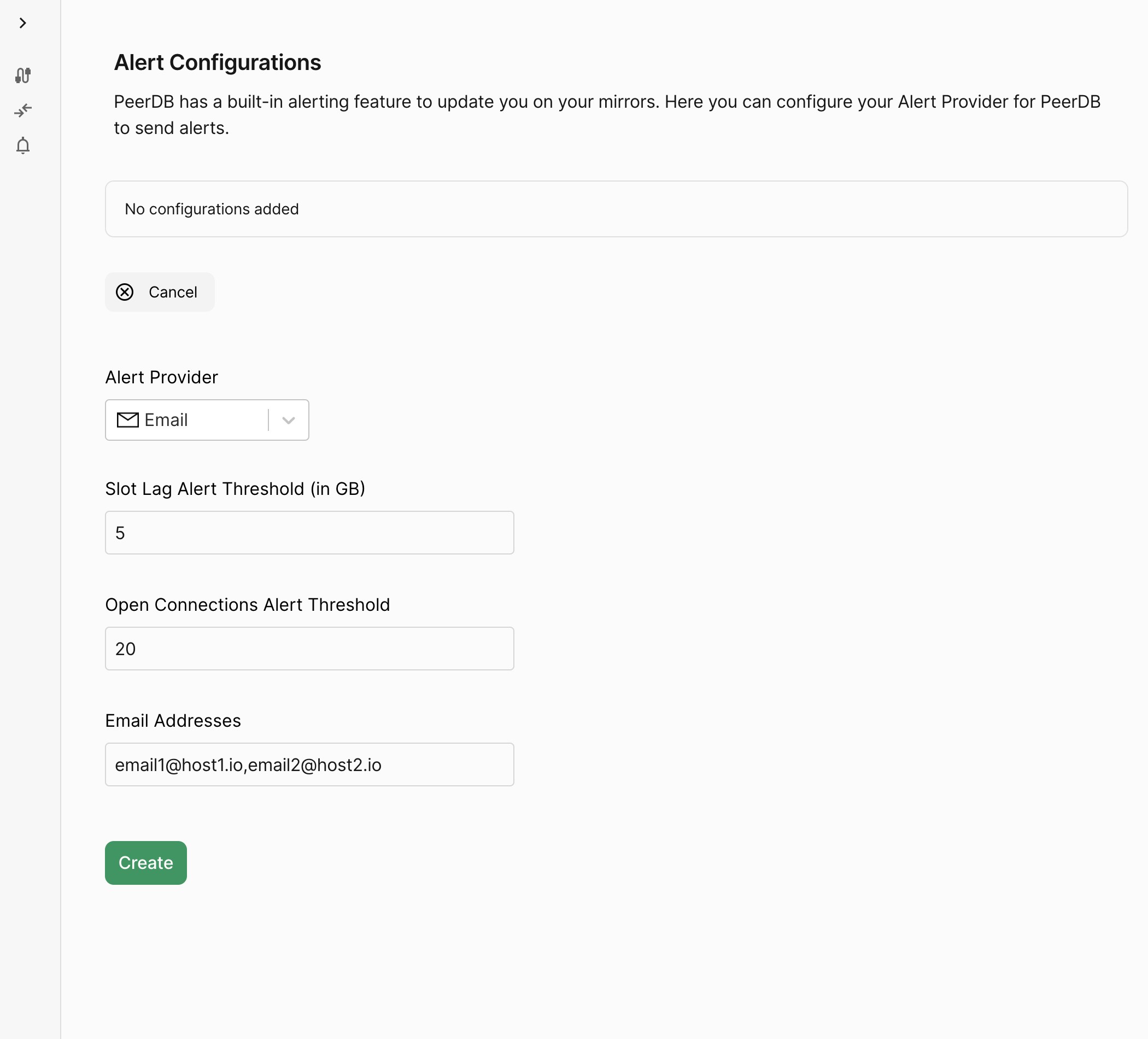
1. Click on "Alert Configuration" from the left side of the PeerDB UI and then click "Add Configuration".
2. Now select "Email" from the list of alert providers and enter the Email Address to be notified.
To add multiple emails for a given configuration, add them comma-separated
3. Click on "Create"
 # Additional configuration for non-PeerDB Cloud Environment
The following list describes the list of environment variables used for configuring Email alerts:
| Variable Name | Description |
| ------------------------------------------------- | ----------------------------------------------------- |
| `PEERDB_ALERTING_EMAIL_SENDER_SOURCE_EMAIL` | Source Email Address |
| `PEERDB_ALERTING_EMAIL_SENDER_CONFIGURATION_SET` | SES Configuration Set to use |
| `PEERDB_ALERTING_EMAIL_SENDER_REGION` | (Optional) SES Region |
| `PEERDB_ALERTING_EMAIL_SENDER_REPLY_TO_ADDRESSES` | (Optional) Comma-separated list of Reply-To addresses |
These need to be set in all the `flow` components of PeerDB.
The PeerDB environment must have `ses:SendEmail` permissions. Refer to the [AWS Documentation](https://docs.aws.amazon.com/sdkref/latest/guide/settings-reference.html) to know more.
# Additional configuration for non-PeerDB Cloud Environment
The following list describes the list of environment variables used for configuring Email alerts:
| Variable Name | Description |
| ------------------------------------------------- | ----------------------------------------------------- |
| `PEERDB_ALERTING_EMAIL_SENDER_SOURCE_EMAIL` | Source Email Address |
| `PEERDB_ALERTING_EMAIL_SENDER_CONFIGURATION_SET` | SES Configuration Set to use |
| `PEERDB_ALERTING_EMAIL_SENDER_REGION` | (Optional) SES Region |
| `PEERDB_ALERTING_EMAIL_SENDER_REPLY_TO_ADDRESSES` | (Optional) Comma-separated list of Reply-To addresses |
These need to be set in all the `flow` components of PeerDB.
The PeerDB environment must have `ses:SendEmail` permissions. Refer to the [AWS Documentation](https://docs.aws.amazon.com/sdkref/latest/guide/settings-reference.html) to know more.